
Software versioning best practices
Five recommendations for software vendors on product names, version identifiers, lifecycle data and vulnerability advisories
In a nutshellRequest demoStart free trialWhy version identifiers matter
X
Quick check: how identifiable is your product?
- Customers and operators - can see at a glance whether their installation is up to date, still supported and affected by a vulnerability.
- Vulnerability scanners - can match CVEs precisely to installed versions without false positives or false negatives.
- End-of-life monitoring - can warn of expiring support in good time.
- CMDB and asset management - can document versions consistently and in an audit-proof manner.
- Vendors themselves - receive fewer support requests and fulfil requirements of regulations such as the Cyber Resilience Act (CRA), e.g. on SBOMs, support periods and vulnerability handling.
1. Define unique product and vendor names
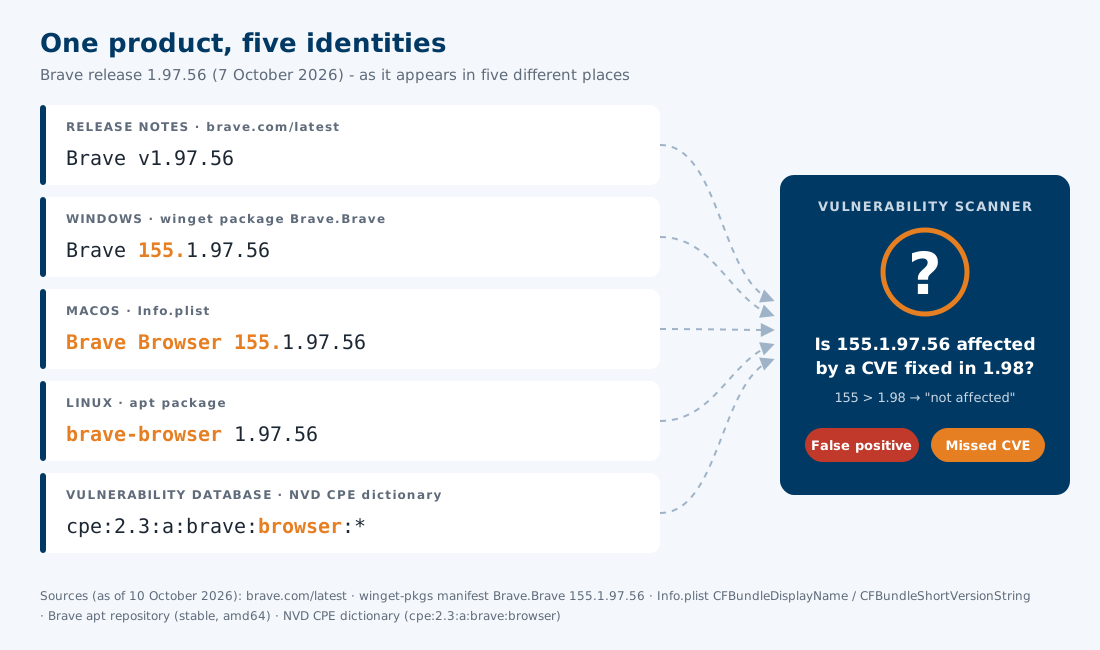
- ✅ - Define a canonical product name and a canonical vendor name, including spelling, spaces, hyphens and capitalisation.
- ✅ - Use different product names only for products that are actually different, e.g. a server and its client.
- ✅ - If a product or vendor is renamed, document the former name and the date of the change in the version history.
- ❌ - Variants of the same name depending on platform, installer or download page.
2. Follow Semantic Versioning
- ✅ - Use exactly one technical version scheme per product and document it.
- ✅ - Always use the same number of components, e.g. 5.0.0 instead of switching between 5, 5.0 and 5.0.0.
- ✅ - Assign each published build exactly one version, and never reuse a version for a different build.
- ❌ - Marketing names without a technical version, e.g. "Spring Release" or "2026 R2". If marketing names are required, map each one unambiguously to a technical version.
- ❌ - Leading zeros, letters as patch level (e.g. 3.1b) and changing separators (e.g. 3.1-2 and 3.1.2 for the same release).
3. Publish the version history online
- Completeness - List all versions, including patch releases and hotfixes. Do not remove older versions from the list once they are no longer supported.
- Unambiguous dates - Use the ISO 8601 date format (YYYY-MM-DD) to avoid confusion between 03/04/2026 and 04/03/2026.
- Stable URL - Keep the address of the version history stable so that it can be referenced and monitored automatically.
- Machine-readable format - Additionally provide the version history as JSON or XML, ideally via an API or a feed.
- CPE mapping - State the Common Platform Enumeration (CPE) identifier of the product in the machine-readable version history, so that vulnerability databases such as the National Vulnerability Database (NVD) can be matched without guesswork.
version-history.jsonjson
{
	"product": "Example Server",
	"vendor": "Example Ltd",
	"cpe": "cpe:2.3:a:example:example_server:*:*:*:*:*:*:*:*",
	"versions": [
		{
			"version": "4.2.1",
			"releaseDate": "2026-09-15",
			"endOfMaintenance": "2027-09-30",
			"endOfSupport": "2028-03-31",
			"releaseNotes": "https://www.example.com/release-notes/4.2.1",
			"fixedVulnerabilities": [ "CVE-2026-12345" ]
		},
		{
			"version": "4.2.0",
			"releaseDate": "2026-07-01",
			"endOfMaintenance": "2027-09-30",
			"endOfSupport": "2028-03-31",
			"releaseNotes": "https://www.example.com/release-notes/4.2.0"
		}
	]
}
4. Make the installed product and version queryable
- Linux - Register the exact product name, vendor name and version in the package metadata, e.g. in the Name, Vendor and Version fields of an RPM package, queryable via rpm -q or dpkg -s.
- Windows - Enter the published product name as DisplayName, the vendor name as Publisher and the version as DisplayVersion in the uninstall registry key and in the file version information, or provide them via winget.
- macOS - Set CFBundleName and CFBundleShortVersionString in Info.plist to the published product name and version; provide Homebrew packages with the same names and version.
- Command line - Support a --version option that outputs the exact version in a parsable form.
- Appliances, containers and services - Provide the version via an API endpoint, an SNMP value or an image label, e.g. org.opencontainers.image.version.
Command linebash
$ example-server --version
4.2.15. Name exact versions in vulnerability advisories
- ❌ - "All versions before the latest release", "version 3.x", "older versions" or "contact support for details".
- ❌ - Version ranges such as "4.0.0 to 4.2.0" or "< 4.2.1", which require knowledge of all versions in between.
- ✅ - List every affected version explicitly, e.g. "affected: 4.0.0, 4.0.1, 4.1.0, 4.1.1, 4.2.0; fixed in: 4.2.1".
- ✅ - Name a fixed version for each supported release line, e.g. 3.8.7 and 4.2.1.
- ✅ - Use the same version identifiers as in the version history and in the installed product.
- ✅ - Publish advisories in machine-readable form, e.g. as CSAF documents with CPE or package URL (purl) identifiers, and list the affected versions individually in the CVE record.
Read more

Product lifecycle & vulnerability
Evaluate every hardware and software version in use for release, EOL and support status and known CVEs – with update recommendations.

Versio.io supported enterprise technologies
Versio.io supports diverse hardware & software, automating IT inventory, reporting, compliance, and management.

Content repository - Common vulnerabilities & exposures
Daily updated vulnerability database (CVE) from NVD, Red Hat, GitHub, Juniper and Palo Alto – the basis for automated vulnerability detection in Versio.io.
Talk to me


Further information